Many iPhone and iPad users complain that the sign-out button of the Apple ID in settings is greyed out. You might wonder why this happens or how this issue can be fixed.
Fortunately, there are various methods you can try to resolve this issue, and we will share some of them in this article. Interested? Read on to learn more.
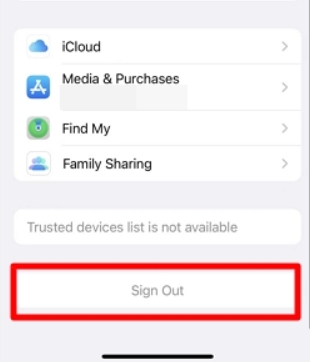
If the "Sign Out" option on your Apple ID is greyed out, it could be due to one of the following reasons:
If you encounter this issue, please follow the instructions below to check for restrictions and resolve the greyed-out Apple ID option.
If the 'Sign Out' option is greyed out with a message stating, 'Sign out is unavailable due to restrictions', the reason is because the device's Screen Time feature is activated.
Screen Time is a built-in feature found in iPhones with iOS 12 and onwards. This feature is designed to monitor the time spent using the device and various apps. You can even set limits and restrictions on the use of specific apps or settings through "Content & Privacy Restrictions" feature in Screen Time.
Though Screen Time benefits its users, it may also prevent you from signing out of your Apple ID. To resolve the issue of the Apple ID Sign Out option being greyed out, you will need to turn off Screen Time on your own or your parent's device, or simply disable the Content & Privacy Restrictions in the Screen Time settings.
If you prefer not to disable Screen Time entirely, you still have option to turn off only the Content & Privacy Restrictions.
After disabling Content & Privacy Restrictions, proceed to Settings > Apple ID and attempt to sign out of your Apple ID.
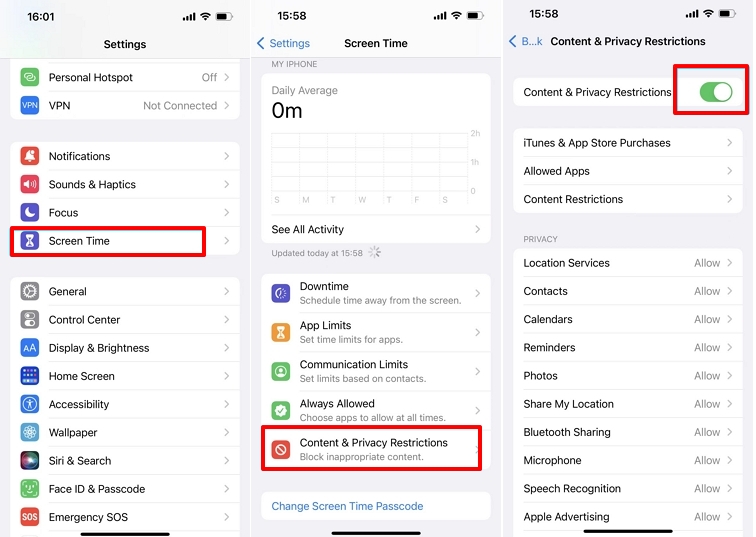
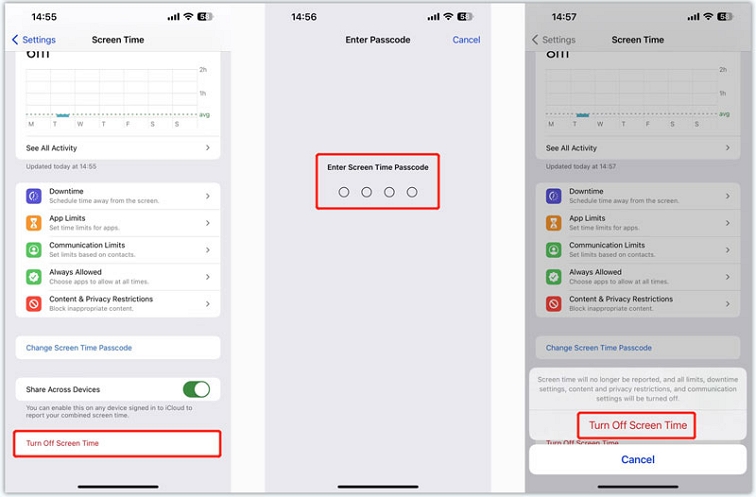
Alternatively, you can try tapping "Turn Off Screen Time" completely to see if it resolves the issue.
Follow the instructions below to turn off your device's Screen Time setup.
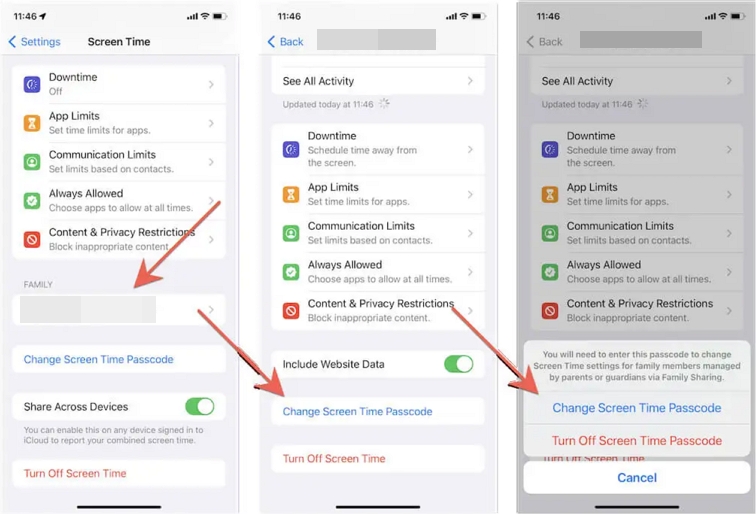
If you're seeking solutions for the Apple ID sign-out greyed-out issue on your child's device, the steps may vary from the instructions provided earlier.
In such a scenario, you'll need to disable Screen Time from the parent device. Here's how:
Another possible reason why you might not be able to sign out of your Apple ID could be because of MDM (Mobile Device Management) installed on your device by your school or workplace.
MDM enables organizations such as schools, businesses, and governments to to remotely troubleshoot and manage iPhones, such as pushing software updates, configuring settings, and providing technical support without requiring physical access to the device.
To check if MDM is active on your device, follow these steps:
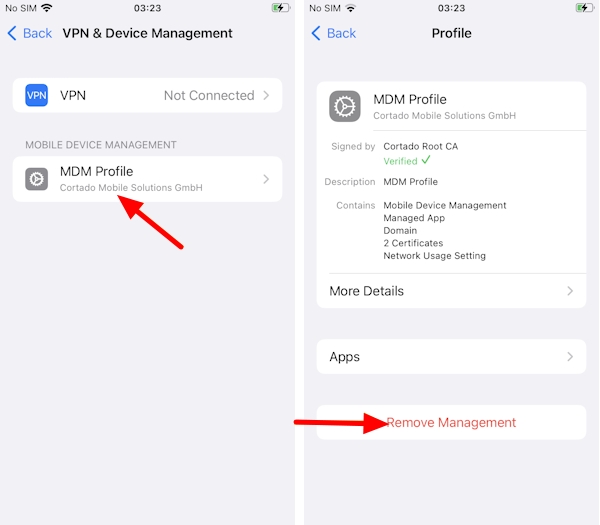
Alternatively, you can:
![This [iPhone]/[iPad] is supervised](https://www.aceclicks.com/res/img/article/this-iphone-is-supervised-and-managed-by-300.jpg)
Before removing MDM from your device, it's crucial to talk to the staff at your school or workplace first. Removing it may affect your access to certain apps and features. It's better to get their guidance on how to proceed.
If you haven't enabled Screen Time settings or there isn't an MDM profile installed on your device, the issue can also arise due to disabled mobile data that needs to be enabled or outdated software that needs updating. Try the following tips to troubleshoot the issue:
We often look hard for a solution somewhere when in fact, the answer is as simple as turning on your mobile data.
Signing out your Apple ID requires an internet connection. Thus if mobile data is disabled, Apple may not allow you to sign out.
To enable your mobile data:
Let's admit it, one of the first things we do whenever we face an issue on our device is reboot it. To do this:
Note: If this method didn't work for you. Don't fuss because there are other methods you can try, which we will discuss further in this article.
Sometimes, we encounter glitches and bugs in our devices, especially if the system is outdated or the latest update isn't successful.
The greyed-out sign-out button might be part of a software bug. You simply need to update your device's system software to fix this issue.
Follow the instructions below to do this.
If the earlier methods still don't work for you, restoring your device would be the last probable solution. Follow the process below to back up and restore your device.
The greyed-out sign-out button can be due to a variety of reasons. One of the most common reasons is because the Screen Time or the MDM feature is activated.
It can also occur due to outdated software that needs to be updated or disabled mobile data that needs to be enabled. However, if these solutions have not worked, backing up and restoring your device could be the last resort to fix the problem.
We hope this article helped you fix the issue with the greyed-out sign-out button. Have any questions? Feel free to jot them down in the comments section below.


 AceFix - iOS System Repair